
PhotoMix
5.3.2
Size: 9.22 MB
Downloads: 5360
Platform: Windows (All Versions)

fCoder Group came up with the PhotoMix application for all the users out there who want to easily and quickly create scrapbooking layouts, collages from their digital photos, and personalized calendars. Select the images you want to use, choose the customization options you want, and in little time you will have something that’s visually stunning.
If your PC has 128MB of RAM, 10MB of free disk space, and is powered by anything from Windows 98 onward, it can run the PhotoMix application. Getting the application up and running is a standard process: download an executable, run it, click through a simple setup wizard. With little effort you will have PhotoMix ready for use in little time.
To make sure you don’t have any problems getting started with PhotoMix, when you first launch the application you are presented with the Help file and with instructions on how to create your first scrapbook. Not that using PhotoMix is a difficult matter, but it’s advisable to go through the Help file to familiarize yourself with the functionality the application has to offer.
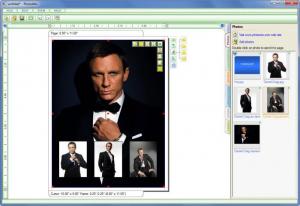
The main pane of PhotoMix’s interface presents the collage you’re working on. In the upper left hand corner there’s a traditional File Menu while on the right hand side there are tabs for adding photos, choosing one of several compositions, borders, backgrounds, and clipart graphics. If you’ve ever used an image editing application before, you should have no problems getting accustomed with the functionality PhotoMix has to offer. You will find it quite easy to arrange the images as you want, to tweak the layouts, to add the backgrounds or borders you want. When you’re done, you can set your creation as the desktop wallpaper, you can save it as a JPG, or you can email it to someone.
Please note that PhotoMix is free to try – the trial version does not let you save your work as JPG nor does it let you print it out.
Create a stunning collage with ease by using the PhotoMix application for Windows.
Pros
You can easily create digital scrapbooks, photo collages, and calendars. There are numerous templates to choose from. You will have no problems getting used to the application’s interface and functionality.

Cons
The Save as Photo and Print functions are disabled in the trial version.

PhotoMix
5.3.2
Download
PhotoMix Awards

PhotoMix Editor’s Review Rating
PhotoMix has been reviewed by George Norman on 06 Sep 2012. Based on the user interface, features and complexity, Findmysoft has rated PhotoMix 4 out of 5 stars, naming it Excellent







